Showing posts with label Microsoft Office. Show all posts

Saturday, 7 April 2012

Making a Quiz in PowerPoint (Description + Video)


Hey everyone...

Today you will all be learning how to make quizzes in MS Powerpoint. Yes, Yes, it is the same which you have installed in your computer, not any other one...

It is a very simple process. Actually, what we make is a multiple choice quiz, in which the player selects an option from the given ones. On clicking the right one, he is directed towards a "CONGRATULATIONS!" page, where he is also given the option to proceed to the next question. Otherwise, in case of clicking a wrong option, he is redirected to "SORRY! WRONG ANSWER" page, where he is given the option to return to the same question.

This method is famous because of its simplicity. You will not have to enter any coding, or anything. All you would have to do is make different slides, and then hyperlinking the texts on it to other slides. Now some of you might be confused with the language used here, as it might seem new to some of you. But believe me, they are all buttons I am talking about, which you would have to click. 

To make this process easier, and this post shorter, I have made a video for you, embedded below. Once you watch it, making quizzes for you would be as easy as a piece of cake (literally).

In the video I have used Microsoft PowerPoint 2010, but the same process can also be done on MS Powerpoint 2007. I did not embed an MS PowerPoint 2003 video cuz its quite old, and no one uses it these days...  Anyhow, watch the video below for more info...


Easy eeh... Ya! I also know... So I guess you would enjoy producing some quizzes...

Yes, I also didnt forget scoring, but the problem was that it would require some visual basic code to be added, which would simply make the quiz complicated, and people would not find it easy to make... So, to keep the simplicity, I think that a quiz like this without scoring would probably work...

See you in my next post... Till then...

Friday, 6 April 2012

Convert Access Database (ACCDB) to EXE


Introduction:

Database is a collection of data, which can be collected using an interface, made in Office Access.

The problem is usually that when we create one, it remains in the ACCDB form, which is an editable one, i.e. one can edit the elements of your database, and use them as their own... But none of us wants that...

I searched over the internet, methods for converting the access database (ACCDB) to EXE, an executable form, but what all did was that they did convert the database into EXE, but it still ran in MS Access.

So, I figured out a way to make an uneditable form of the currently present Database (ACCDB) to a format ACCDE, which cannot be edited, and then making an installation package for ACCDE, which will install the ACCDE in the Program Files of the user's computer. 

The following conditions should be met before continuing with the process:
  1. MS Access 2010/2007 installed
  2. Inno Setup Compiler installed (Can be downloaded for free here)
  3. A license file in .txt format (if you want it)
  4. An icon file in the format .ico, needed for the installation file
The method was an easy one, which is shown below in the video. Using that, anyone can convert and protect their own databases, which can be used, but not copied. 


I hope you learned much from the video... But after all this, I have found one drawback of the ACCDE file, which is that an ACCDE file created in 64-Bit version of MS Access will not work with 32-Bit versions of MS Office/Access, whereas vice versa is also applicable. So a solution to this problem is that you can label the specific databases as ACCDE (32-Bit) (made in 32-Bit versions of Office), and ACCDE 64-Bit, made in 64-Bit versions of Office.

Have a nice day, till the next post...

Monday, 2 January 2012

Activating Office 2010 (Office 2010 Toolkit 2.2.3) (Tested)


We all might have used MS Office 2007, and after hearing about the new release, have once tried to upgrade to Office 2010, like I did, but reverted back to the old version because of the activation problem.  If you are stuck on MS Office 2007, you should upgrade to Office 2010, because the activation process is here. If you are new to Office 2010, read the comparison here! Otherwise, read on for the process!

Thursday, 29 December 2011

Microsoft Office 2010 vs. Microsoft Office 2007: A Comparison


When installing Office, we think ten times whether to install Office 2007 or 2010. Most of the people don't care about the version, as they say that they like the one that's easy. These people should correct their opinion, as everything first tough is learnt, and nothing comes easily. Anyways, today I will be comparing features of the two versions. I am in the favor of Office 2010, as I myself am using it, and would also like those who have office 2007, to just try it. Obviously, I am talking about the Professional Plus version.

Wednesday, 28 December 2011

Writing Urdu in Microsoft Office (Original Nastaleeq)

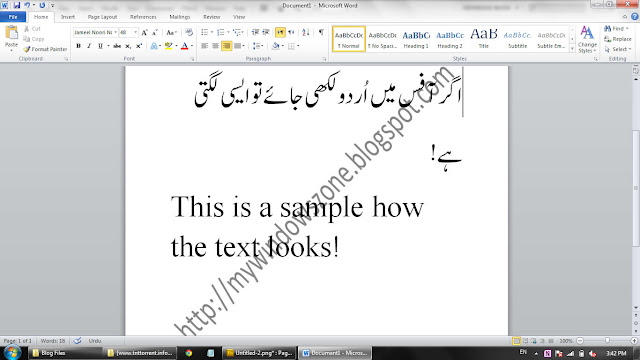
Have you ever thought of writing Urdu in your native word processor? Obviously! Who wouldn't love to write Urdu in his/her own native Microsoft Office Applications... Well, now you can! Many solutions have been provided by different websites all over the web, but none comes to the standards. A sample image of how Urdu written in Microsoft Word 2010 looks:


Likewise, Urdu can also be written in other applications such as Power Point, Excel and even Access. Yes, it is now very easy to have urdu based spreadsheets, and even presentations in Urdu. But in most of the solutions given on the net, the style of Urdu language, like that shown in the screen shot above is absent, and the standard Arabic style is adopted for writing Urdu. Well that's not cool! But after reading this post, you will be able to write Urdu as shown above in your Microsoft Word, Excel, and any other Microsoft Application! You will even be able to send and receive Urdu Emails, and read the urdu news paper at the NawaiWaqt website! This technique will work in any version of Microsoft Office, be it 2010, 2007, 2003, or even 2000!